Remove grain, ISO noise, and color speckle from any photo using AI. The denoiser intelligently separates image noise from real detail — so you get cleaner photos without the blurry, over-processed look that standard filters produce. Ideal for low-light shots, high-ISO camera images, phone photos, and scanned prints.
Around 1.8 trillion photos were taken worldwide in 2024 — the vast majority on smartphones, whose small sensors pick up noise in low light. Rise Above Research
Quick answer
AI image denoising removes grain, ISO noise, and JPEG compression artifacts while preserving real detail. Unlike blur filters that smear texture, EnhanceCraft separates noise from genuine image content, so low-light shots, high-ISO photos, and compressed downloads come out clean and sharp instead of soft and over-processed.
Grain + color
ISO grain, luminance, color, and scanner noise
Adjustable
Strength slider for fine control
< 30s
Processing time
Before
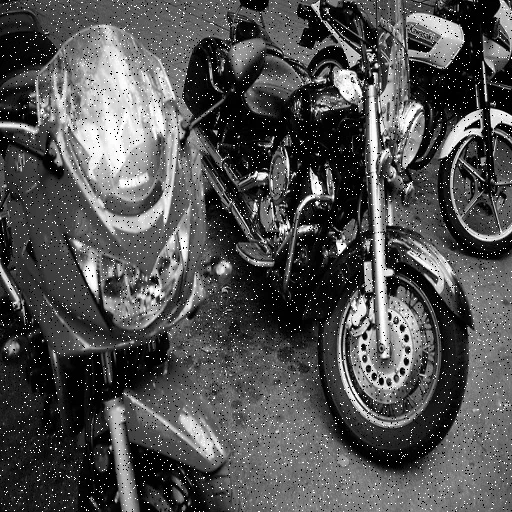
After
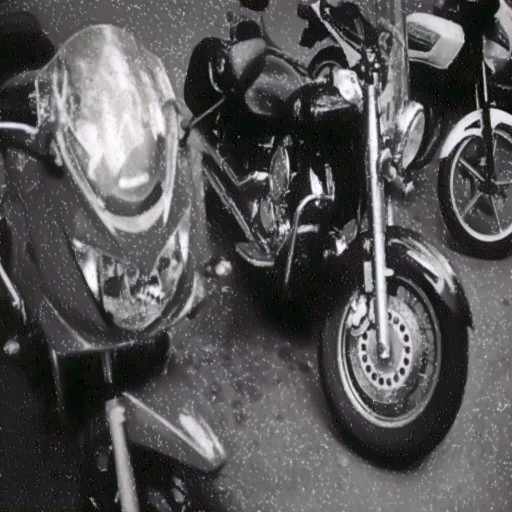
Want more proof? See before & after results for every tool.
Wedding reception, concert, restaurant, or any indoor shooting situation forces high ISO settings that introduce grain. Denoise cleans those shots without blurring the subject.
Supplier-provided product photos are often compressed repeatedly before they reach you. AI denoising removes the JPEG artifacts that make products look cheap and unsharp.
Scanned old photos accumulate scanner noise on top of existing film grain. Denoising cleans the scan so the actual photo detail becomes visible.
Photos downloaded from social media or messaging apps have been compressed multiple times. Denoising restores sharpness before re-uploading for professional use.
Upload the photo to the free AI image denoiser, set the denoising strength (or keep the default), and download the clean result. The AI removes grain and noise in under 30 seconds — no editing skills or sign-up needed.
It removes ISO grain, luminance noise, color noise, and scanner noise — the random grain a camera sensor or scanner produces. Mild JPEG compression artifacts often soften too, but heavy blocking is a different defect and clears only partly.
Noise mostly comes from too little light reaching the sensor: shooting in dim conditions at high ISO, or using a small smartphone sensor that gathers less light per pixel. The AI denoiser is trained on exactly this kind of real camera noise.
Yes. Denoise 2 photos per day free without an account. Create a free account for 25 credits.
At moderate strength settings, the AI preserves fine detail while removing noise. At maximum strength, some fine texture may be smoothed. Unlike simple blur filters, the AI distinguishes noise from real detail.
A blur or smoothing filter reduces noise by softening everything indiscriminately, so fine detail gets flattened along with the grain. This denoiser is trained to tell structured detail — edges, texture, fabric — apart from random sensor noise, so it removes the noise pattern specifically while keeping the detail underneath.
