
Upscale a Passport Photo with AI — Increase Resolution & Clarity
A passport-style photo needs to be sharp and clear at a precise small size, but a low-resolution headshot looks soft when enlarged or printed. AI upscaling increases the resolution of a passport photo and sharpens facial detail, so it stays clean whether you print it or upload it. Always check the official size, background, and expression rules for your document — those are your responsibility.
Quick answer
How do you increase the resolution of a passport photo?
AI upscaling enlarges a passport-style headshot while reconstructing sharp facial detail, so a small or soft photo becomes clear enough to print or upload. EnhanceCraft does this in seconds; pair it with face restoration for extra clarity. Always confirm the official size, background, and pose rules yourself.
4x / 8x
Upscaling options
25
Free credits to start
< 15s
Processing time
Before
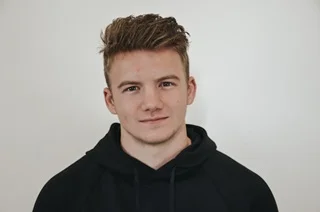
After (AI upscaled)

25 free credits to start, then 10 every month. No credit card. No watermarks.
Upscale Your Photo FreeHow to upscale images with AI
- 1Upload your image — JPEG, PNG, or WebP, up to 25 MB (50 MB on paid plans).
- 2Select your scale factor — 2x or 4x free, 8x on any paid plan — depending on your target resolution.
- 3AI processes the image in under 15 seconds, reconstructing lost detail.
- 4Download your upscaled image — watermark-free with a free account, up to 1,200px on the long edge (full resolution on paid plans).
Frequently Asked Questions
What size is a passport photo?
Many countries use a 2×2 inch (51×51 mm) passport photo, which at 300 DPI is about 600×600 pixels; others differ. AI upscaling can bring a smaller headshot up to a crisp resolution for that size — but always verify the exact dimensions your specific document requires.
Does EnhanceCraft make an official, compliant passport photo?
No. EnhanceCraft increases resolution and sharpness — it does not validate official requirements like exact dimensions, background color, head position, or expression. Use it to improve image clarity, then confirm compliance against your country's official passport photo rules before submitting.
Should I use face restoration on a passport photo?
If the original is soft or low resolution, yes. Run face restoration first to sharpen eyes, skin, and facial features, then upscale. The combination produces a noticeably clearer headshot than upscaling alone — useful for both printed and digital submissions.
Can I upscale an old photo to use for a document?
You can improve its resolution and sharpness, but most documents require a recent photo. Use upscaling to clean up a recent low-resolution headshot rather than to repurpose an outdated one, and follow the official recency rules for your document.