
EnhanceCraft vs Autoenhance.ai: Real Estate Photo Editing Compared
Autoenhance.ai is a solid, purpose-built tool for correcting real estate photos — merging exposure brackets, pulling window detail, and straightening verticals from RAW files. EnhanceCraft covers that same correction work and goes further: virtual staging for empty rooms, one-click day-to-dusk conversion, and a broader toolkit beyond real estate, all with a free tier and no software to install.
Quick answer
Is EnhanceCraft a good Autoenhance.ai alternative?
Yes, if you want more than raw-photo correction. EnhanceCraft matches Autoenhance.ai on window pull, sky replacement, and perspective correction, and adds virtual staging with a compliance label and one-click day-to-dusk conversion — neither of which Autoenhance offers. Autoenhance keeps an edge for photographers who shoot RAW exposure brackets and need HDR merging.
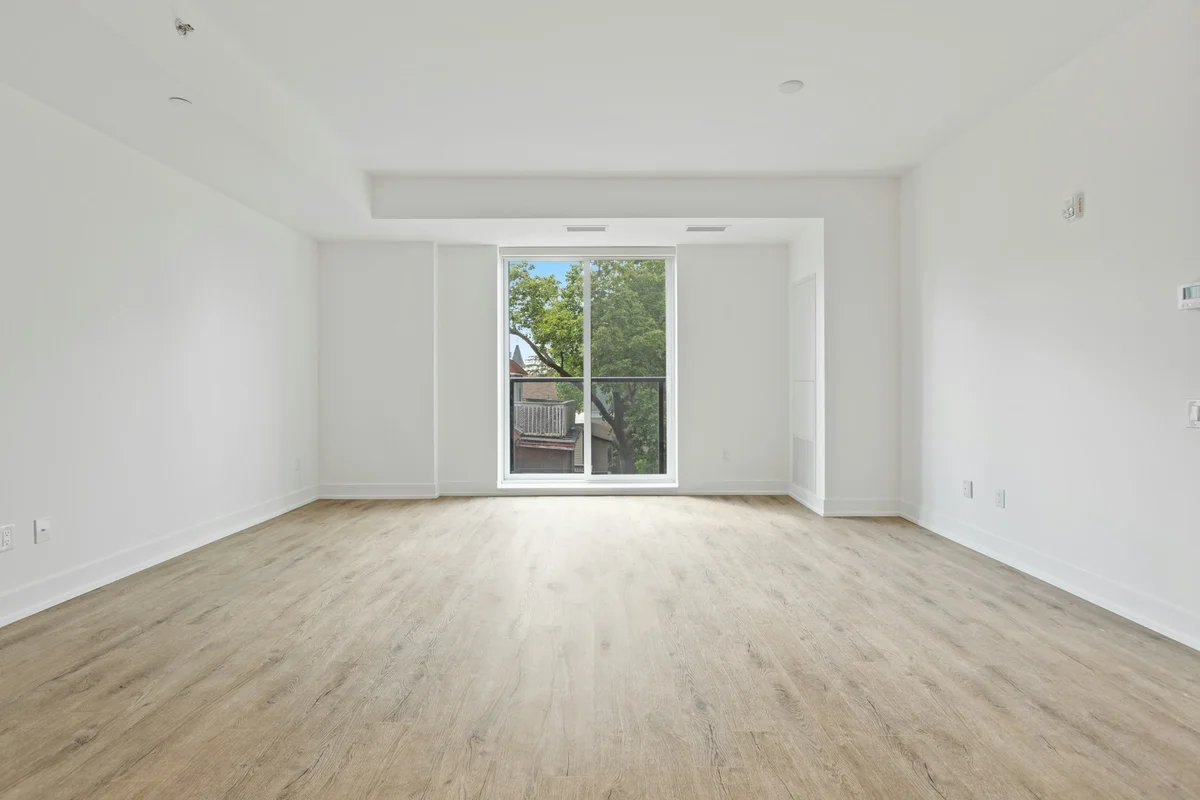
Before (empty room)
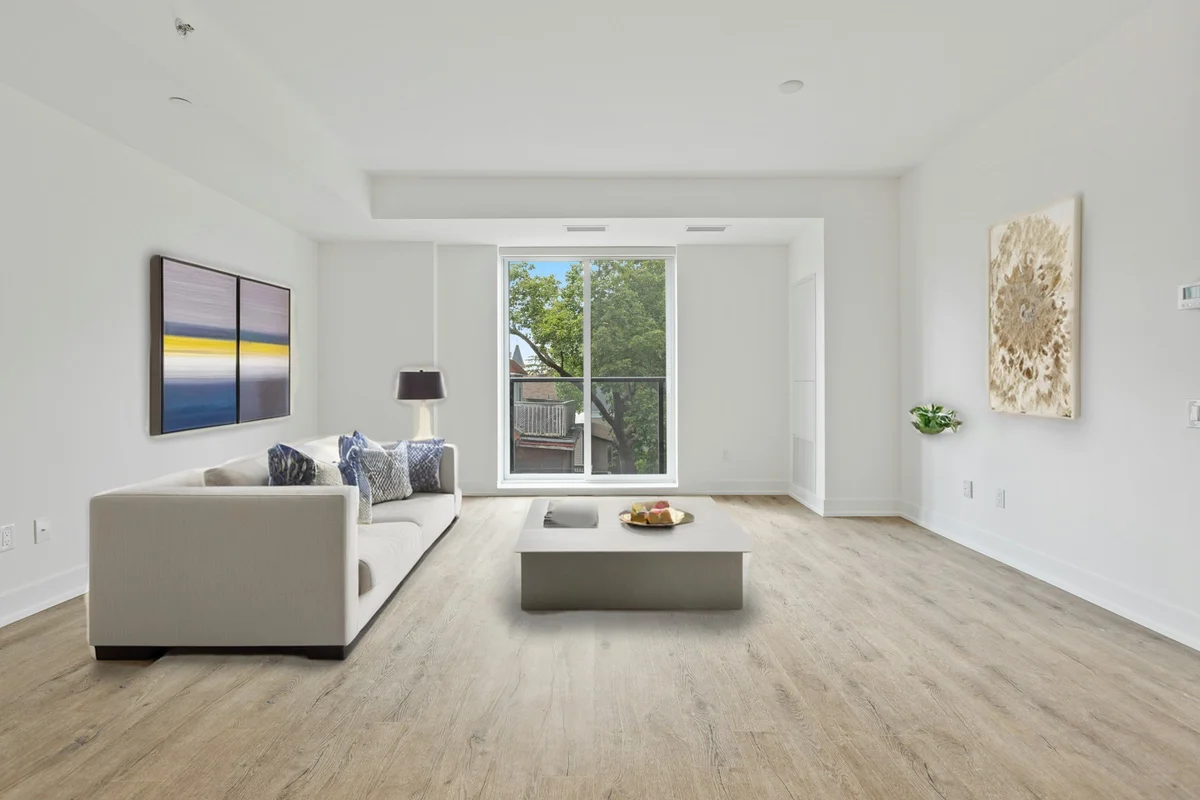
After (AI virtual staging)
Quick Verdict
Choose Autoenhance.ai if:
You shoot RAW exposure brackets and want them merged into one balanced HDR photo automatically, plus dedicated camera-reflection removal and auto privacy blurring on every shot.
Choose EnhanceCraft if:
You need to stage empty rooms, turn daytime exteriors into twilight shots, or want the correction tools plus a full AI toolkit — all with a free tier and no install.
Feature Comparison
| Feature | EnhanceCraft | Autoenhance.ai |
|---|---|---|
| Window pull (fix blown-out windows) | ✅ | ✅ |
| Sky replacement | ✅ | ✅ |
| Day-to-dusk / twilight conversion | ✅ | ❌ Not offered |
| Virtual staging (furnish empty rooms) | ✅ With compliance label | ❌ Cannot stage a room |
| Perspective & vertical correction | ✅ | ✅ |
| Color correction & white balance | ✅ | ✅ |
| HDR bracket merging (multiple exposures → one photo) | ❌ | ✅ |
| RAW file upload | ❌ JPG / PNG / WebP | ✅ |
| Camera & reflection removal | ⚠️ Via object removal | ✅ Dedicated tool |
| Auto privacy blur (faces, plates) | ⚠️ Via object removal | ✅ Auto-detect |
| 360° photo enhancement | ❌ | ✅ |
| Batch processing a full shoot | ✅ | ✅ |
| Public API | ✅ | ✅ |
| Tools beyond real estate (product photos, restoration, upscaling) | ✅ Full toolkit | ❌ Real estate only |
| Free tier | 25 first month, then 10/mo (watermarked, up to 1200px) | Free preview, watermarked export |
Why Agents Switch to EnhanceCraft
It stages the room, not just the photo.
Autoenhance.ai corrects a photo you already have — it can’t furnish an empty room. EnhanceCraft’s virtual staging adds realistic, perspective-correct furniture to an empty listing photo in one click, with a "Virtually Staged" label built in so the listing stays compliant.
One click turns day into dusk.
Twilight listing photos get more clicks, but a real dusk shoot means waiting for a 20-minute window at the right time of day. EnhanceCraft’s day-to-dusk tool swaps the sky, regrades the light, and switches on a warm window glow automatically — Autoenhance doesn’t offer this.
Free credits every month, not just a preview.
Autoenhance’s free tier lets you preview edits, but exports carry a watermark until you subscribe. EnhanceCraft gives 25 free credits to start, then 10 every month, with real downloads (watermarked, up to 1200px on the long edge) and no card required — and pay-as-you-go credits that never expire if you’d rather not subscribe.
One toolkit past the listing.
Beyond real estate, EnhanceCraft also handles product photography, old-photo restoration, face repair, and general upscaling — useful if an agency also manages marketing photos, headshots, or social content on the same account.
Where Autoenhance.ai Has the Edge
If you shoot RAW exposure brackets on-site, Autoenhance.ai merges them into one balanced HDR photo automatically — EnhanceCraft works from a single JPG, PNG, or WebP export instead. Autoenhance also has dedicated camera-and-reflection removal and auto privacy blurring built in as named tools, and it supports 360° photo enhancement, which EnhanceCraft doesn’t currently offer. For a pure bracket-to-HDR photographer workflow, Autoenhance is a strong, purpose-built choice.
Frequently Asked Questions
Is EnhanceCraft a good Autoenhance.ai alternative?
Yes, especially if you want more than raw-photo correction. EnhanceCraft matches Autoenhance on window pull, sky replacement, perspective correction, and color balancing, and adds virtual staging with a compliance label and one-click day-to-dusk conversion — neither of which Autoenhance offers. Autoenhance keeps an edge on HDR bracket merging and RAW file support for photographers who shoot exposure brackets.
Does Autoenhance.ai offer virtual staging?
No. Autoenhance.ai is built to correct photos you already have — it cannot furnish or stage an empty room. EnhanceCraft’s virtual staging tool adds realistic furniture to an empty room in one click, with a "Virtually Staged" label included by default for listing compliance.
Is there a free real estate photo editing alternative to Autoenhance.ai?
Yes. EnhanceCraft gives you 25 free credits to start, then 10 every month, with no credit card required, and every result downloads (watermarked, up to 1200px). Autoenhance.ai’s free tier lets you preview edits, and its exports carry a watermark too.
Can EnhanceCraft process a whole property shoot at once?
Yes. Every real-estate tool — the edit pack, window pull, sky replacement, day-to-dusk, and virtual staging — supports batch mode, so you can run the same correction or look across an entire listing’s photo set in one job.
Try the Autoenhance.ai Alternative Free
25 free credits to start, then 10 every month. No credit card. No install. Works in your browser.