EnhanceCraft vs Autoenhance.ai: Which Real Estate Photo Editor Should You Use?
Both fix a real estate photo well. Only one of them can furnish an empty room or turn a daytime exterior into a twilight shot. Here’s the honest breakdown.
Munib Ali Laghari
Founder & Lead Developer
Quick answer
EnhanceCraft or Autoenhance.ai — which should you use for real estate photos?
Both fix a blown-out window, replace a dull sky, and straighten walls equally well. The real difference: Autoenhance merges RAW exposure brackets into one HDR photo automatically and accepts RAW files, which EnhanceCraft doesn’t. EnhanceCraft can furnish an empty room with virtual staging and turn a daytime exterior into a twilight shot in one click — neither of which Autoenhance offers.
Prefer the quick side-by-side? See the at-a-glance feature table and verdict.
EnhanceCraft vs Autoenhance.ai →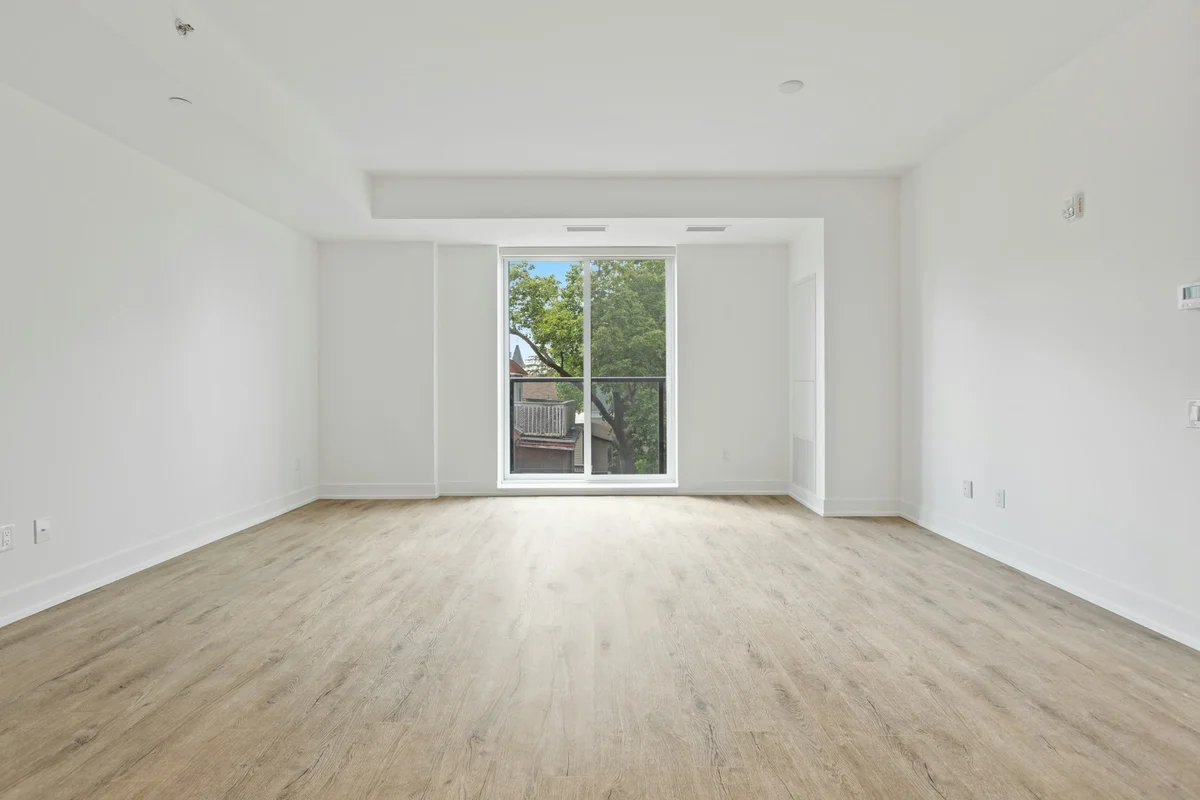
Say you've just got the photos back from a listing shoot. A few windows are blown out to white, the sky is that flat grey you get on an overcast Tuesday, and one bedroom is completely empty — no furniture, no rug, nothing to help a buyer picture themselves in it. You need this gallery MLS-ready by tonight, not next week.
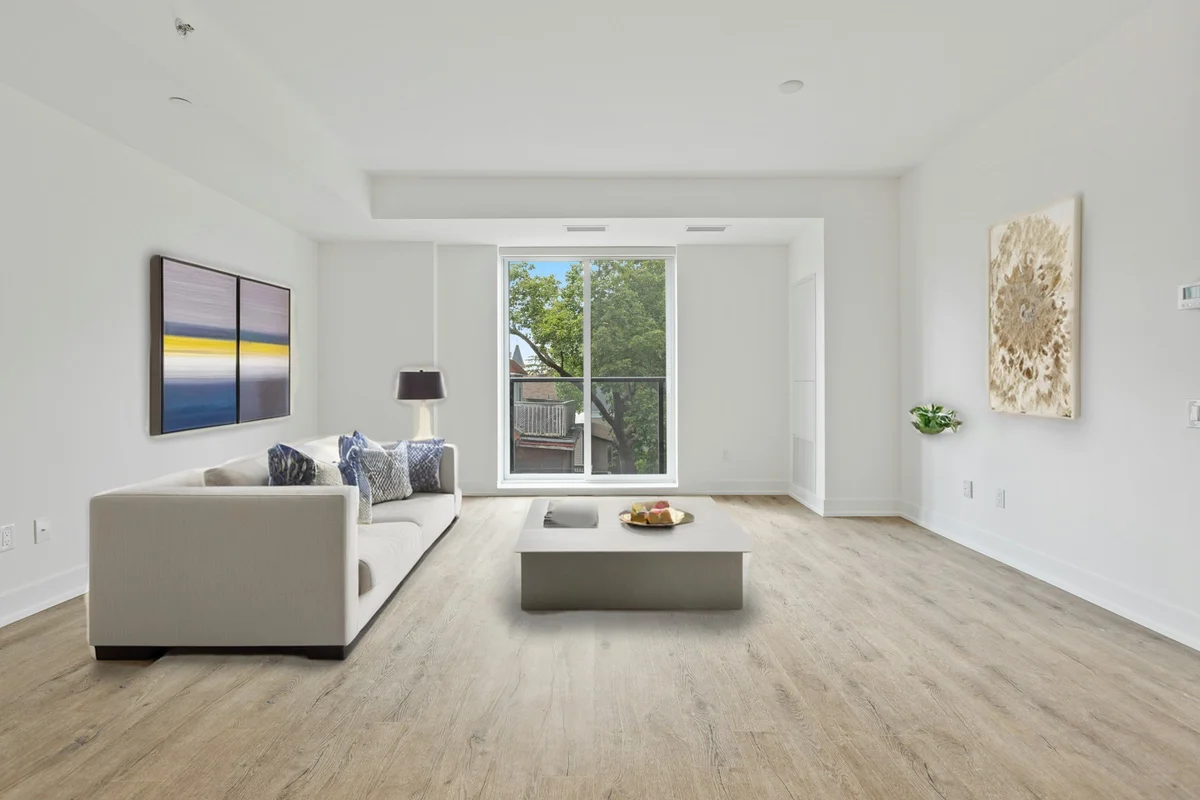
That's the exact job both Autoenhance.ai and EnhanceCraft are built for. Autoenhance has been doing real estate photo correction for a while and does it well — it's a solid, purpose-built tool that a lot of photographers already use. EnhanceCraft covers that same correction work and then does a couple of things Autoenhance simply can't: it can furnish that empty bedroom, and it can turn the daytime exterior shot into a twilight one, without you touching either tool twice.
Here's the honest, feature-by-feature version — including the parts where Autoenhance genuinely has the edge.
What Autoenhance.ai Does Well
Autoenhance is built around one specific photographer workflow: you shoot a room at three or four different exposures (a "bracket") so nothing is too dark or too blown out, and Autoenhance merges those exposures into one balanced photo automatically. If that's how you shoot, this matters — it's real, useful automation, and it's a big part of what Autoenhance is known for. On top of that, it pulls detail back into blown-out windows, replaces dull skies, straightens leaning walls, and — this is a nice touch — it can spot and remove a photographer's own reflection caught in a mirror or window, plus blur out faces and license plates automatically for privacy. It also accepts RAW camera files directly, which matters if that's your workflow.
Where the Two Tools Really Differ
Here's the thing Autoenhance can't do at all: stage a room. If a listing photo shows an empty living room, Autoenhance will happily fix the lighting and straighten the walls, but it's still an empty room when you're done. It's a correction tool, not a furnishing one.
EnhanceCraft's virtual staging does exactly that — pick a room type and a style, and it adds furniture that actually sits correctly in the space, with a "Virtually Staged" label included automatically so the listing stays compliant with the disclosure rules most states and MLSs now expect. We wrote about what those disclosure rules actually require if you want the details.
The second gap is twilight photography. Listings shot at dusk — warm light in the windows, a rich evening sky — reliably get more clicks than the same house shot at 2pm. The catch is that a real twilight shoot means showing up and waiting for a 20-minute window of exactly the right light. EnhanceCraft's day-to-dusk tool does the same transformation to a daytime photo in one pass: swaps the sky, warms up the whole scene, and switches on a glow in the windows so the house looks lived-in. Autoenhance doesn't offer this as a feature.
Being Fair About Where Autoenhance Wins
It would be easy to just list what EnhanceCraft adds and call it a day, but that's not the whole picture. If your workflow is genuinely built around shooting RAW exposure brackets on-site, Autoenhance's bracket merging is a real, purpose-built advantage — EnhanceCraft works from a single JPG, PNG, or WebP file, so you'd need to export your RAW files first. Autoenhance also has two dedicated, auto-detecting features EnhanceCraft doesn't: reflection removal (for catching a photographer accidentally caught in a mirror) and automatic privacy blurring for faces and plates. And it supports 360° photo enhancement, which isn't something EnhanceCraft currently offers.
None of that is spin — if your whole job is bracket-to-HDR photo correction with nothing else, Autoenhance is a genuinely strong, focused tool for it.
What Each One Actually Covers
| What you need | EnhanceCraft | Autoenhance.ai |
|---|---|---|
| Fix a blown-out window | Yes | Yes |
| Replace a dull sky | Yes | Yes |
| Straighten leaning walls | Yes | Yes |
| Merge exposure brackets into one HDR photo | No — works from one file | Yes |
| Accept RAW camera files | No — JPG, PNG, WebP | Yes |
| Furnish an empty room | Yes, with a compliance label | No |
| Turn daytime into twilight | Yes, one click | No |
| Remove a photographer's reflection | Manually, via object removal | Yes, automatic |
| Blur faces and license plates | Manually, via object removal | Yes, automatic |
| Handle a whole shoot in one batch | Yes | Yes |
| Tools outside real estate (products, restoration, upscaling) | Yes | No — real estate only |
What This Actually Costs You
Autoenhance runs on a subscription or pay-per-image model, with a free way to preview edits before you commit — though exports on the free tier carry a watermark until you're on a paid plan. EnhanceCraft gives you 25 credits to start, then 10 every month, with no card required to sign up; free results carry a small watermark too, and any paid plan or credit pack removes it. Real estate jobs are priced per correction rather than per photo — the standard edit pack runs 2 to 4 credits depending on interior or exterior and whether you add window recovery, sky replacement is 2 credits, day-to-dusk is 3, and virtual staging is 6. Both platforms also offer pay-as-you-go and API access if you're processing at scale.
So Which Should You Use?
If your day-to-day is shooting exposure brackets in RAW and you mainly need those merged and corrected — nothing more — Autoenhance is a solid, dedicated tool that does that one job well.
If you also need to stage empty rooms, want the option to turn a daytime shot into a twilight hero image, or would rather have one account that also handles product photos or portrait restoration, EnhanceCraft covers the same correction work and adds the parts of a listing shoot that Autoenhance can't touch. For the average agent or independent photographer juggling a whole listing — not just brackets — that combination tends to save the second subscription. If neither is quite right, our roundup of the best AI tools for real estate photos covers five more options, sorted by the job each one does best.
Frequently Asked Questions
Is EnhanceCraft a good Autoenhance.ai alternative? Yes, especially if you need more than photo correction. EnhanceCraft matches Autoenhance on window pull, sky replacement, and perspective correction, and adds virtual staging with a compliance label plus one-click day-to-dusk conversion — neither of which Autoenhance offers. Autoenhance keeps a real advantage for photographers who shoot RAW exposure brackets and want them merged automatically.
Does Autoenhance.ai offer virtual staging? No. Autoenhance corrects photos you already have — it can't furnish an empty room. EnhanceCraft's virtual staging tool adds realistic, perspective-correct furniture to an empty listing photo in one click, with a "Virtually Staged" label included by default.
Can Autoenhance.ai do day-to-dusk or twilight photos? Not as a listed feature. EnhanceCraft's day-to-dusk tool converts a daytime exterior into a twilight shot — new sky, warmer light, glowing windows — in one pass.
Which tool is better for photographers who shoot RAW exposure brackets? Autoenhance.ai, for that specific workflow. It merges bracketed RAW exposures into one balanced photo automatically and accepts RAW files directly. EnhanceCraft works from a single JPG, PNG, or WebP image, so RAW brackets would need to be exported and merged before uploading.
Is there a free alternative to Autoenhance.ai for real estate photos? Yes. EnhanceCraft gives 25 free credits to start, then 10 every month, with no credit card required. Every result downloads (watermarked, up to 1200px), while Autoenhance's free tier lets you preview edits, with exports watermarked until you subscribe.
The Bottom Line
Neither tool is wrong — they're just built for slightly different jobs. Autoenhance is a focused correction engine for photographers working from RAW brackets. EnhanceCraft covers that same correction work and adds the two things a listing photo set often actually needs beyond correction: a furnished room and a twilight hero shot. See the full feature comparison or try virtual staging free — 25 credits to start, then 10 every month, no card required.
Found this helpful?
Share it with your network
Ready to try it yourself?
25 free credits to start, then 10 every month. No credit card. Process your first image in under 15 seconds.
Get Started FreeMunib Ali Laghari
Founder & Lead Developer · EnhanceCraft
Munib Ali Laghari is the founder and lead developer of EnhanceCraft, an AI image toolkit. He writes about AI upscaling, photo restoration, and background removal. Connect on LinkedIn