Can ChatGPT Unblur a Photo? Generative vs Faithful AI Fixes
ChatGPT can make a blurry photo look sharper, but it redraws the picture. Here’s why faces and text change, and when you need a faithful fix instead.
Munib Ali Laghari
Founder & Lead Developer
Quick answer
Can ChatGPT unblur a photo?
Partly. ChatGPT returns a sharper-looking image, but it redraws the photo instead of removing the blur, so faces, text, and small details can change. That’s fine for a fun social post. For family photos, listings, or anything used as a record, use a faithful deblur or upscaler, like EnhanceCraft, that works from your original pixels.
Before
After
More examples like this: browse before & after results across every tool.
Upload a blurry photo to ChatGPT, ask it to make the photo clearer, and you'll usually get back something that looks great. Sharp eyes, crisp edges, clean skin. Then you look closer, and your aunt's smile is slightly different, or the shop sign behind her says a word it never said.
That isn't a bug in one app. It's what happens when a generative model "fixes" a photo: it doesn't remove the blur, it draws a new picture that matches your description of the old one. This guide explains why, what the research says, when that's perfectly fine, and how to sharpen a photo when the details have to stay true.
One disclosure: I'm the founder of EnhanceCraft, an AI image toolkit that takes the other approach, so I have a side in this. I haven't run a ChatGPT test for this post. Where I describe a test, I name who ran it, and everything about our own tools is checked against our code.
Can ChatGPT Unblur a Photo?
ChatGPT can give you a sharper-looking version of a blurry photo, but it doesn't recover what the camera missed. It generates a new image that resembles yours. Faces, text, and small details can change between the original and the result, and between one attempt and the next.
The reason starts with what blur is. When a photo is out of focus or shaken, the fine detail is smeared across neighboring pixels. Some of it can be worked back out, especially with motion blur, where the smear follows a pattern. But past a certain point the information is simply gone, and any tool that shows you sharp detail there is estimating it.
A generative model is very good at estimating. It has seen millions of faces, letters, and textures, so it fills the gaps with what usually goes there. That's why the result looks convincing. It's also why the result isn't evidence of what was actually in front of the lens.
OpenAI is fairly open about this in its image generation guide for developers. It says "Masking with GPT Image is entirely prompt-based," and that the model "uses the mask as guidance, but may not follow its exact shape with complete precision." Among its listed limitations, it says the model "may occasionally struggle to maintain visual consistency" for recurring characters across generations. Those notes are about OpenAI's image models in general, not the ChatGPT app specifically, but the behavior people report in ChatGPT matches them.
Can ChatGPT upscale an image? It can return a larger-looking image, within limits. The same developer guide lists 1024 × 1024, 1536 × 1024, and 1024 × 1536 as the recommended sizes, says no edge may exceed 3,840 pixels, and calls anything above 2560 × 1440 experimental. I couldn't find equivalent published numbers for the ChatGPT app. Either way, a bigger file made by redrawing is not the same thing as your photo with more real detail.
Generative vs Faithful: What's the Difference?
A generative fix redraws the image from what the model has learned, guided by your prompt. A faithful fix works from the photo's own pixels and is trained to stay as close to the real, sharp version as it can, with no prompt to interpret.
| Generative fix (ChatGPT-style) | Faithful fix (dedicated deblur or upscaler) | |
|---|---|---|
| What it does | Draws a new image that matches your photo and your instructions | Undoes blur or adds resolution, working from the original pixels |
| Takes a text prompt | Yes | No |
| Can change faces, text, or objects | Yes, sometimes noticeably | Rarely in structure; fine texture is still estimated |
| Same result every run | No, results vary between attempts | Designed to be consistent |
| Typical failure | Looks perfect, but details are wrong | Looks imperfect: leftover softness, halos, or odd texture |
| Best for | Creative edits, fun social posts, illustrations | Family photos, listings, records, anything that must stay true |
Two honest caveats. First, "faithful" doesn't mean zero guessing. A good upscaler has also learned what edges and textures look like, and it uses that to rebuild fine texture. The difference is scale: it sharpens what's there instead of deciding what should be there. Second, the most important row is the failure mode. When a faithful tool fails, you can usually see it. When a generative tool fails, the result can look flawless and still be wrong, which is far harder to catch.
Why Does ChatGPT Change Faces and Text?
Because staying true to the original and looking perfectly realistic pull in opposite directions, and generative tools pick realism. This isn't just an opinion. It's a proven result in image-restoration research.
In 2018, Yochai Blau and Tomer Michaeli published The Perception-Distortion Tradeoff at CVPR, one of the main computer-vision conferences. They wrote that "we prove mathematically that distortion and perceptual quality are at odds with each other." In plain terms: a restoration method that stays closest to the true image, on average, will tend to look a little soft and cautious. A method that produces images indistinguishable from real photos has to give up some of that closeness. You can trade one for the other, but past a point you can't have both.
A generative model sits at the "looks real" end. Faced with a blurry face, it doesn't hedge. It commits to one specific, sharp face that fits the blur. Sometimes that face is very close to the real person. Sometimes it's a convincing stranger.
Faces and text are where you notice, for different reasons:
- ●Faces: people are extremely sensitive to small changes in eye spacing, nose shape, or the line of a smile. A shift that would be invisible on a brick wall reads as "that's not her."
- ●Text: the model knows what letters look like, not what your particular sign or label said. A blurred word gets replaced with a plausible word.
When Generative "Enhancement" Invents Detail: Documented Cases
The pattern repeats wherever generative upscaling meets a real photo: the output looks sharp, and the specifics are made up. These examples are documented by the people who built the tools, a court, and a published test.
- ●The researchers said it outright. PULSE was a 2020 research method (CVPR 2020) that turned tiny pixelated faces into sharp portraits. Its authors' project page warns that "PULSE makes imaginary faces of people who do not exist, which should not be confused for real people," and that it "will not help identify or reconstruct the original image." The authors also added a section on bias to the paper after people pointed it out.
- ●A court refused to accept it. In 2024, a judge in King County Superior Court in Washington State excluded AI-enhanced bystander video from a triple-homicide trial. As NBC News reported, the order said the technology relies on "opaque methods to represent what the AI model 'thinks' should be shown."
- ●Phone makers describe it the same way. Google's post on the Pixel 10 Pro's 100x zoom explains that it runs a diffusion model that "uses the few details that are there, like shapes and colors" and fills in the rest. That's an honest description of generative enhancement: real starting clues, invented finish.
- ●A published ChatGPT test caught a changed word. unblurry.tools blurred a 1938 street photo, so the true original was known, then ran it through ChatGPT three times. All three runs read the shop sign "Cronley's" as "Crowley's," and the three results differed from each other more than their own tool's runs did. Two cautions: it's a single image, and unblurry.tools sells a competing unblur tool. Still, it matches the mechanism above exactly.
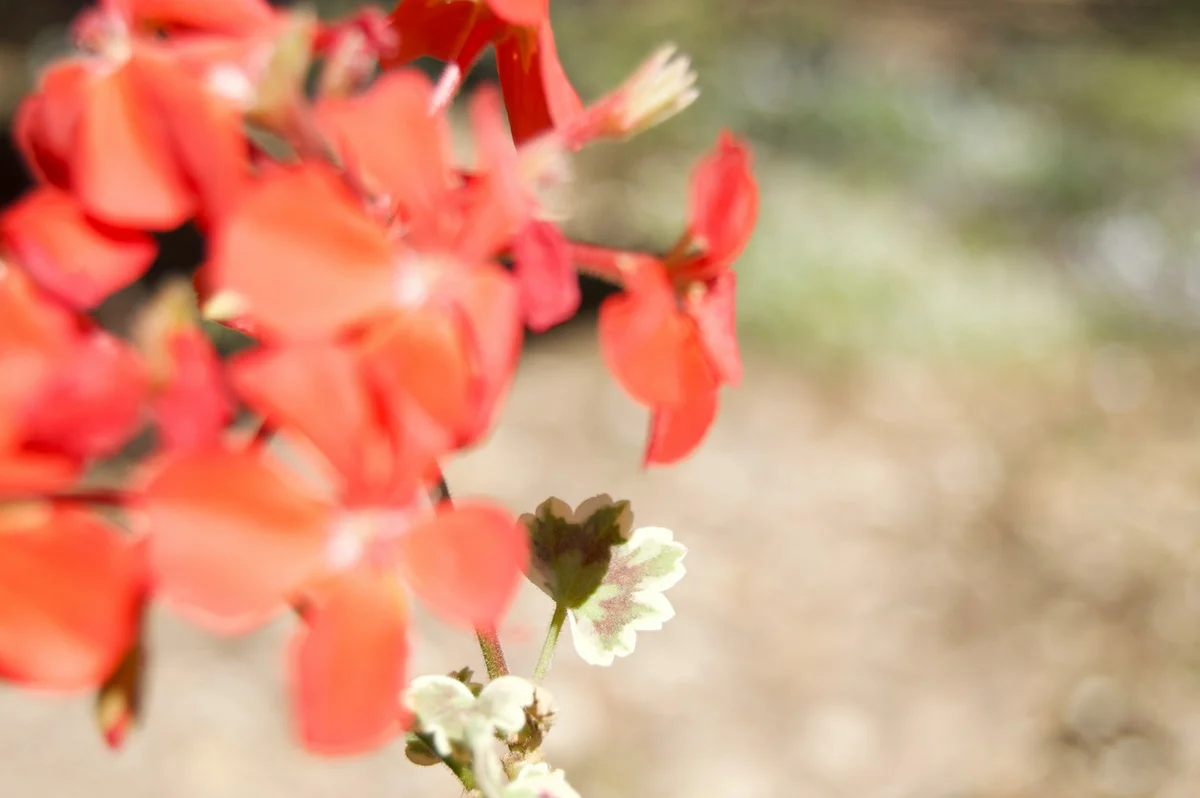
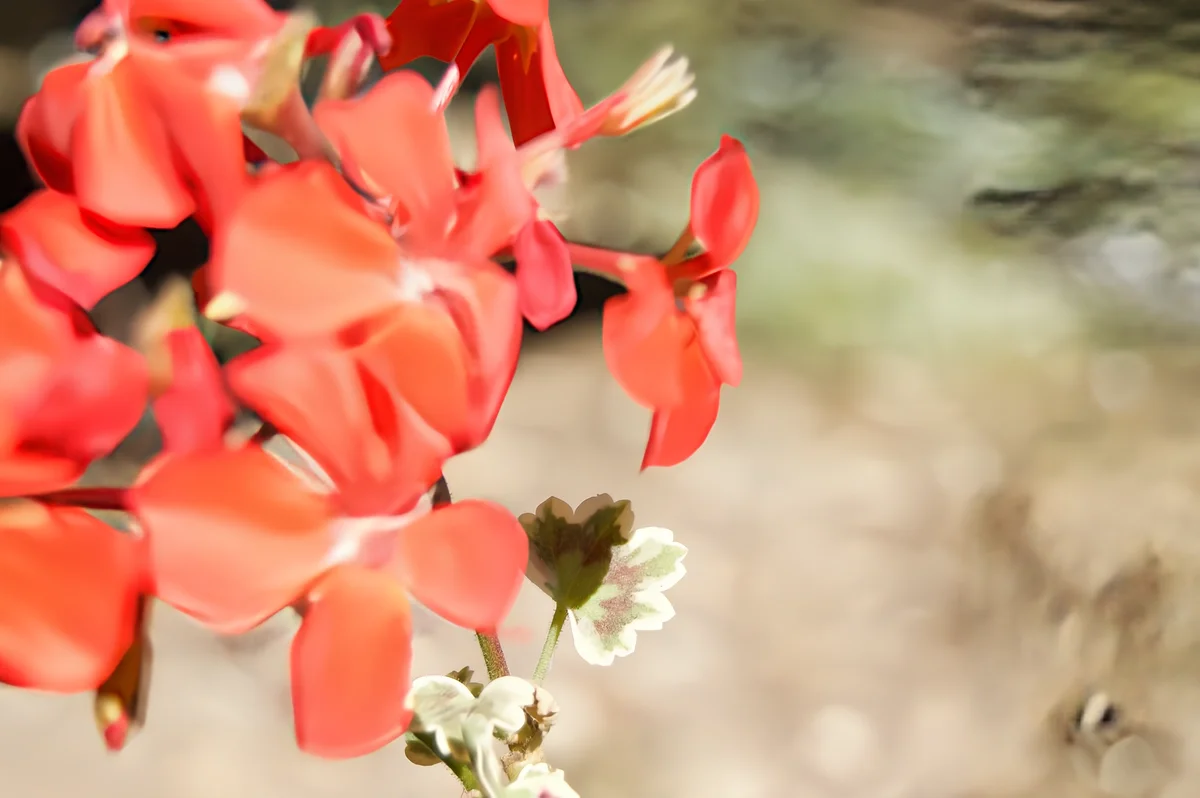
For contrast, here's how a faithful tool fails. In our own deblur demo (the before and after at the top of this page), the petal edges come out crisper with the same shapes, and nothing new appears in the flowers. But the soft, out-of-focus background picks up some streaky texture, because the model treats deliberate background blur as blur to undo. It's a visible flaw you can spot and decide about, not a believable change you might never notice.
When Is a Generative Fix Fine, and When Do You Need a Faithful One?
Use a generative fix when the photo only has to look good. Use a faithful fix when the photo has to stay true to what was really there. Here's how that plays out:
| What the photo is for | Generative fix OK? | Why |
|---|---|---|
| A fun social post or profile picture of yourself | Usually fine | You can judge whether it still looks like you |
| AI art, illustrations, concept images | Yes | Invented detail is the point; see our [Magnific comparison](/blog/enhancecraft-vs-magnific-ai) |
| Old family photos | No | The face is the record. A convincing stranger is worse than a soft original |
| Product listing photos | No | Buyers rely on the photo to know what arrives |
| Real-estate listing photos | No | Changing what a property looks like now carries disclosure rules in some places |
| Evidence, insurance, or official records | No | A court has already rejected AI-enhanced footage as unreliable |
| Reading a plate, sign, or label from a blurry photo | Neither | If it isn't legible in the original, any reading is a guess |
The listing rows aren't just good manners. Etsy's listing image rules call for "original photos of the actual product buyers will receive." Amazon's rule for AI-generated people exempts an image that "only features real people (even if they have been altered with AI tools)," which puts editing a real photo and synthesizing one on opposite sides of the line; our AI product photography cost breakdown covers what that means for sellers. For real estate, California's AB 723 draws the same line between correcting a photo and changing the property, which we walk through in the state of AI image enhancement in 2026.
There's a trust side too. Shoppers and viewers don't object to AI editing so much as to being shown something that wasn't real, a shift we covered in authentic vs "too perfect" photos.
How to Ask ChatGPT to Fix a Photo Without Changing the Face
Ask for a light touch, name exactly what must not change, and then check the result against the original at full size. Prompts reduce drift. They don't stop it, because the model is still redrawing the image.
- 1.Ask for restraint, not "enhance." Something like: "Make this photo slightly sharper. Do not change anyone's face, expression, hair, or skin. Do not change any text, logos, or the composition." Words like "enhance" or "make it HD" invite the model to beautify.
- 2.List what has to stay. Name the people, the number of people, any visible text word for word, and anything distinctive: a scar, a gap in the teeth, a specific pattern on a shirt.
- 3.Compare at 100% zoom, side by side. Check eye spacing, the shape of the nose, the hairline, teeth, and ears. Read every word of text letter by letter against the original. Our AI photo restoration guide has a fuller version of this face check.
- 4.Don't treat agreement between runs as proof. If two attempts disagree about a detail, neither one knows. If they agree, they may share the same guess.
- 5.Keep the original, and label the edit. If you share or print a regenerated photo, keep the untouched file, and don't present the new one as the original record.
If a face matters and the result fails the check, stop prompting and switch to a faithful workflow.
How to Fix a Blurry Photo With AI Without Inventing Detail
Match the tool to the type of blur, work from the original file, and check faces and text at full size after each step. A faithful workflow looks like this:
- 1.Work out what kind of blur you have. Motion blur (camera shake or a moving subject) leaves directional streaks. Focus blur makes everything uniformly soft. A small or heavily compressed file just lacks pixels. Our AI deblurring guide has a 30-second check for telling them apart.
- 2.For motion blur, start with a deblur tool. EnhanceCraft's image deblur is trained on motion blur and works from your photo's pixels with no prompt. Its strength control runs from 0.5x to 1.5x: below 1x blends the result back toward the original, and above 1x pushes edges harder than the model's own result, which can look overdone. It costs 2 credits.
- 3.For a small file, upscale. The image upscaler enlarges 2x or 4x on the free plan (8x on paid plans) and rebuilds edges and texture as it goes. It has no prompt and doesn't redraw the scene. Check tiny text and logos afterwards, since that's where any upscaler is most likely to guess.
- 4.For soft faces, restore last and check closely. Face restoration rebuilds facial detail using what it has learned about faces, so it's the most generative step in this workflow. On a face that's only a few pixels wide, it can drift too. Compare it at 100% against the original. For old prints, the photo restoration tool has a Face Enhancement slider where lower values keep closer to the original face.
- 5.Accept the limit. If a detail isn't in the photo, no tool can recover it. A soft but true photo is often the right result.
A couple of practical limits: on the free plan, downloads are capped at 1,200 pixels on the long edge, and output made without signing in carries a watermark. For a full-resolution file, you need a paid plan or a pay-as-you-go credit pack. If you're deciding how far to enlarge, our 2x vs 4x vs 8x guide helps.
Frequently Asked Questions
Can ChatGPT unblur a photo? It can produce a sharper-looking version, but it generates a new image that resembles yours rather than removing the blur. Faces, text, and small details can change. That's fine for a fun post, but not for family photos, listings, or records.
Can ChatGPT upscale an image to 4K? Not reliably. OpenAI's developer guide for its image models recommends sizes like 1536 × 1024, allows edges up to 3,840 pixels, and calls anything above 2560 × 1440 experimental. A larger file made by redrawing also isn't the same as real added detail.
How do I get ChatGPT to enhance a photo without changing the face? Ask for a slight sharpening, explicitly forbid changes to faces, expressions, text, and composition, and list distinctive features. Then compare the result at 100% zoom against the original. Prompts reduce drift but can't eliminate it, because the model still redraws the image.
Does ChatGPT give the same result every time? No. Generative models produce a different image on each attempt, and small details like lettering or facial features can vary between runs. In one published test, three ChatGPT runs on the same blurred photo differed from each other more than a dedicated unblur tool's runs did.
Can any AI recover detail that isn't in the photo? No. AI can undo some blur, especially motion blur, and rebuild plausible texture, but detail that was never captured can only be estimated. Research on the perception–distortion tradeoff shows that looking perfectly real and staying true to the original pull against each other.
Does AI upscaling add fake detail? A little. A good upscaler rebuilds fine texture from what it has learned, so tiny details are partly estimated. A faithful upscaler doesn't take prompts or redraw the scene, though. A generative upscaler can invent new structure, like a different face or a changed word, which is the bigger risk.
Keep the Photo, Lose the Blur
ChatGPT is a good choice when you want a fun, polished picture and the details don't need to match the original. When they do, you want a tool that works from your pixels and tells you the truth about what's there, even if that's a slightly softer photo.
To try the faithful route, use the free image upscaler or restore a soft face, with 25 credits to start, then 10 every month, no card required. Our AI image toolkit overview covers the rest.
Found this helpful?
Share it with your network
Ready to try it yourself?
25 free credits to start, then 10 every month. No credit card. Process your first image in under 15 seconds.
Try Image Upscaler freeMunib Ali Laghari
Founder & Lead Developer · EnhanceCraft
Munib Ali Laghari is the founder and lead developer of EnhanceCraft, an AI image toolkit. He writes about AI upscaling, photo restoration, and background removal. Connect on LinkedIn