Virtual Staging vs Physical Staging in 2026: Cost, Speed & Compliance
Virtual staging vs physical staging compared on cost, speed, and 2026 MLS compliance. See why AI staging wins on price and turnaround — and how to disclose it.
Munib Ali Laghari
Founder & Lead Developer
Quick answer
Is virtual staging better than physical staging?
Virtual staging furnishes a room digitally for a few dollars per photo in seconds; physical staging places real furniture for a median $1,500 over weeks. Virtual staging wins on cost and speed for listing photos; physical staging still helps at in-person showings. Both are fine if the virtual edit is clearly disclosed — EnhanceCraft labels every result "Virtually Staged."
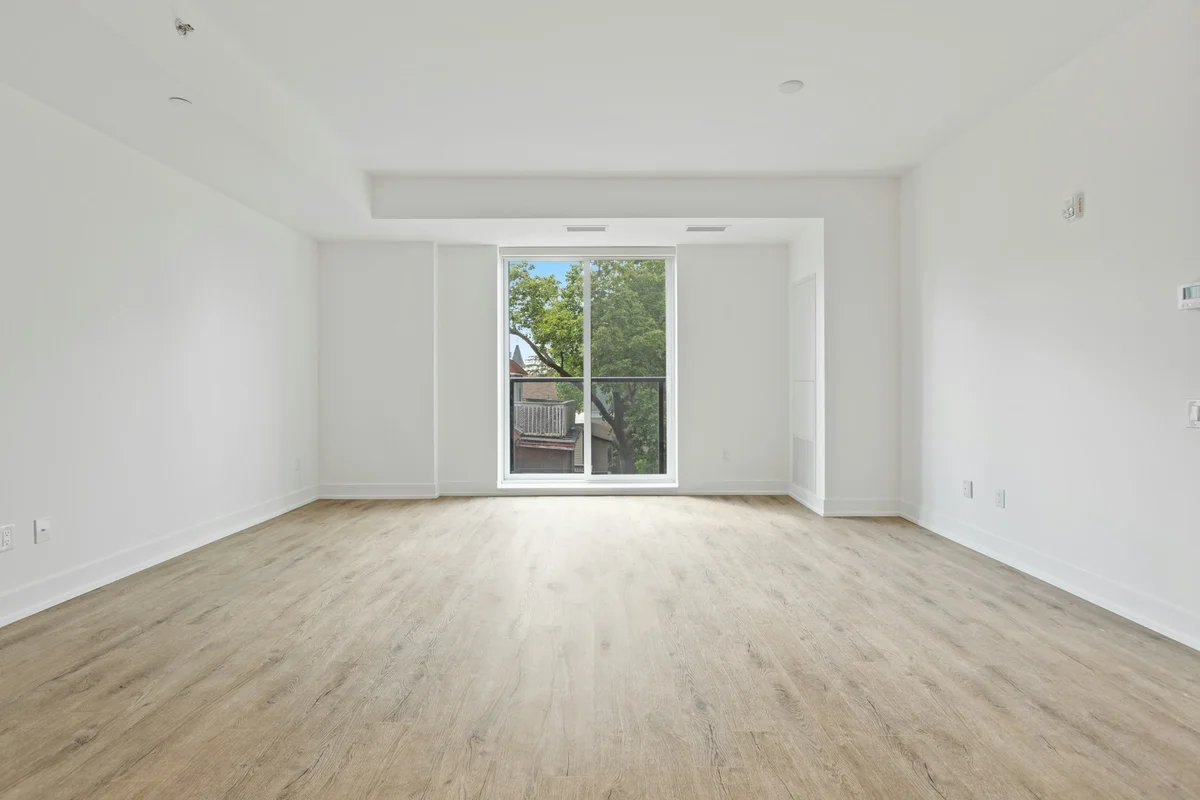
Before
After
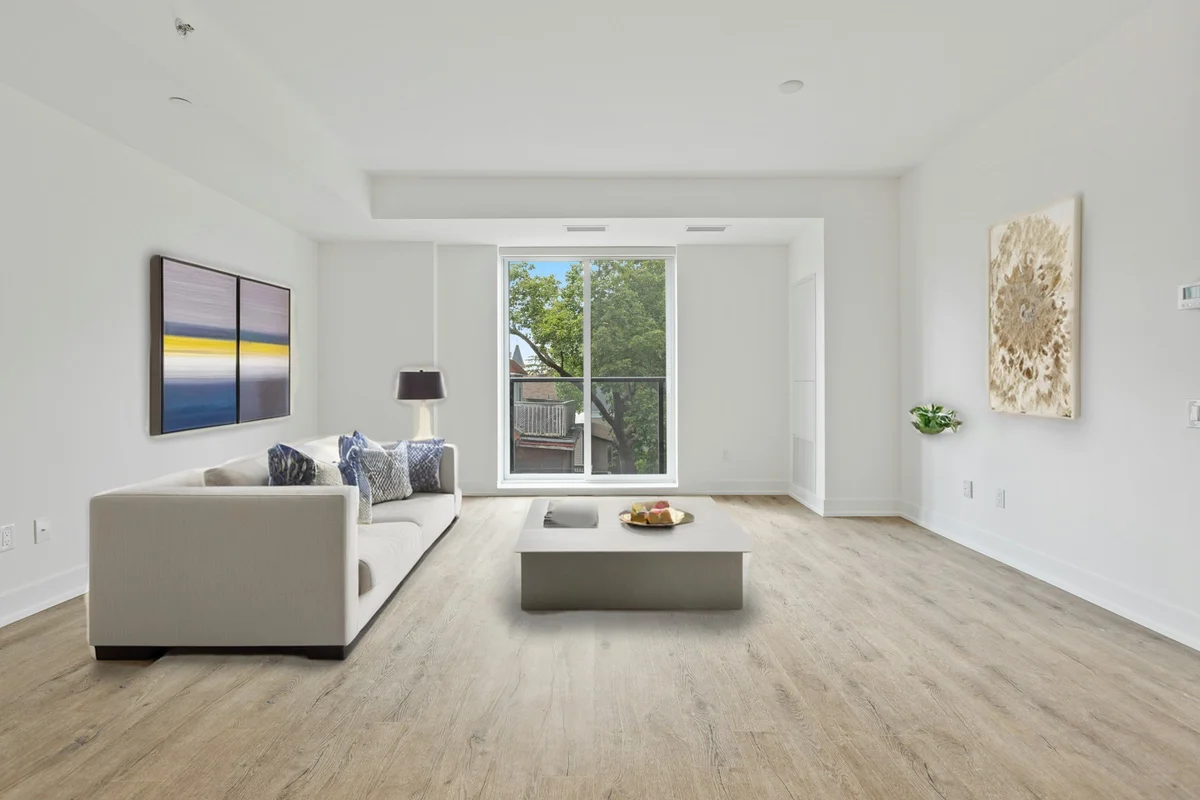
More examples like this: browse before & after results across every tool.
An empty room is the hardest thing to sell. Bare floors and blank walls give buyers nothing to picture themselves in, and a gallery of vacant rooms scrolls right past the listings that look warm and lived-in. Staging solves that — and in 2026 you have two ways to do it. Physical staging moves real furniture into the home. Virtual staging adds the furniture digitally, inside the photo. This guide compares them head to head on the three things that actually decide which to use: cost, speed, and compliance.
If you have ever staged a property the traditional way, you know the drill: source the furniture, book the delivery, arrange the rooms, shoot, then schedule a second trip weeks later to haul it all back out. It works, but it is slow and expensive, and it only makes sense above a certain price point. Meanwhile the listing has to go live now, the seller wants it done yesterday, and half your inventory is vacant rentals and new-construction units that no stager will touch for a reasonable fee.
Virtual staging removes most of that friction. You take a photo of the empty room and furnish it digitally in seconds, for a fraction of the cost, with no logistics at all. The trade-off is that the home is still empty when a buyer walks through it in person — which is exactly why the honest answer to "which is better" is "it depends on what the photo has to do." Below, we break down the cost, the speed, the sell-through evidence, and the 2026 disclosure rules you have to follow to use virtual staging safely.
What Is the Difference Between Virtual and Physical Staging?
Physical staging places real, rented furniture and decor inside a home so buyers can walk through a furnished space. Virtual staging adds that furniture digitally to a listing photo, so the room looks furnished online while staying empty in person. Both exist to do the same job — help a buyer imagine living there — but one changes the house and the other changes the picture.
That single distinction drives everything else. Because physical staging changes the actual home, it carries furniture rental, delivery, installation, storage, and removal costs, and it benefits both the photos and the in-person showing. Because virtual staging only changes the photo, it costs a few dollars, takes seconds, and benefits the online listing — but it must be disclosed as an edited image, and the room is still bare when buyers visit.
Virtual Staging vs Physical Staging: The Side-by-Side
At a glance, virtual staging wins decisively on cost, speed, and flexibility, while physical staging keeps one advantage that still matters: it furnishes the home for in-person showings, not just the photos. Here is how the two methods compare on the factors agents and photographers weigh most.
| Factor | Physical staging | Virtual staging |
|---|---|---|
| What it changes | Real furniture placed in the home | Furniture added digitally in the photo |
| Typical cost | Median $1,500 for a staging service, often a recurring monthly rental | A few dollars per photo (6 credits per image with EnhanceCraft) |
| Time to result | Days to weeks — schedule, deliver, arrange, later remove | Seconds to minutes per photo |
| Logistics | Rental, delivery, install, storage, removal | None — upload a photo |
| Helps online listing | Yes | Yes |
| Helps in-person showing | Yes — buyers tour a furnished home | No — the home is still empty in person |
| Restyle or redo | Costly — a new furniture order | Free — pick another style and re-run |
| Disclosure | Not an altered image | Must be disclosed as virtually staged |
The pattern is clear: for the listing photos that decide whether a buyer clicks, virtual staging does the same job for a tiny fraction of the cost and time. Physical staging earns its premium only when the in-person experience of a furnished home is worth the spend — typically higher-end listings where buyers expect to walk into a styled space.
Cost: Why Virtual Staging Is a Fraction of the Price
Virtual staging costs a few dollars per photo; physical staging costs an order of magnitude more. The median cost of using a professional staging service was $1,500, according to the National Association of Realtors 2025 Profile of Home Staging — and that figure is often a recurring monthly rental, not a one-time fee, because staged furniture stays in the home until it sells.
Physical staging is expensive for structural reasons, not because anyone is overcharging. You are paying for real furniture, a delivery crew, on-site styling, weeks or months of rental while the home is listed, and a second trip to remove everything. Virtual staging has none of those line items. You furnish the photo once, for the cost of processing a single image — 6 credits per image with EnhanceCraft — and you are done. If the home sits on the market for three months, the virtual photo costs exactly the same as it did on day one, while a physical rental keeps billing.
The flexibility compounds the savings. With physical staging, restyling a room means a new furniture order. With virtual staging, trying a different look costs nothing but another render — so you can show the same living room as modern, Scandinavian, or coastal and let the listing agent pick, without re-renting a thing.
Speed: One Click vs a Two-Week Project
Virtual staging turns a furnished listing photo around in seconds; physical staging is a multi-day project. A traditional stage means sourcing furniture, booking a delivery window, arranging the rooms, shooting, and later scheduling removal — easily one to three weeks end to end. Virtual staging takes an empty-room photo you already have and furnishes it before your coffee gets cold.
That speed is the difference between staging every listing and staging only the ones that justify the effort. A working real estate photographer or agent turning around several properties a week cannot physically stage them all — the logistics do not scale. Virtual staging does: it is a one-click step on any empty-room photo, so a vacant rental, a new-construction unit, or a quick relisting can all go live looking furnished on the same day the photos are taken.
Does Staging Actually Help a Home Sell?
Yes — staging consistently helps buyers connect with a home and can shorten time on market. In the NAR 2025 Profile of Home Staging, 83% of buyers' agents said staging made it easier for a buyer to envision the property as their future home, and nearly half (49%) of sellers' agents observed that staging reduced the time homes spent on the market. Almost three in ten agents (29%) reported staging led to a 1% to 10% increase in the dollar value buyers offered.
The mechanism is the same one that makes any strong listing photo valuable: a furnished room earns more clicks, more clicks earn more showings, and more showings shorten the path to an offer. Staging — virtual or physical — is what turns a bare, forgettable room into a photo a buyer stops on. Virtual staging simply captures most of that visualization benefit in the listing gallery, where the majority of buyers form their first impression, at a fraction of the cost.
One honest caveat: the NAR figures measure staging broadly, and most of that history is physical staging. Virtual staging is the efficient way to win the online first impression; it does not furnish the home a buyer physically walks into. Use it to make the photos work hard, and reserve physical staging for the listings where the in-person experience needs to be furnished too.
When Physical Staging Still Wins
Physical staging still wins whenever the in-person showing matters as much as the photos. Virtual staging furnishes the picture, not the property — so a buyer who books a tour after seeing beautifully staged photos walks into an empty room. For luxury listings, model homes, and markets where buyers expect to experience a furnished space, that gap between the photo and the walk-through can disappoint.
Physical staging is the right call when the home itself is the showcase: high-end properties where buyers tour in person and expect to feel the lifestyle, open-house-driven sales, and situations where a tactile, furnished experience closes the deal. For everything else — and especially for vacant rentals, new construction, and the large share of buyers who shortlist homes entirely online before touring — virtual staging delivers the visualization benefit where it counts first, in the photos. Many agents use both: virtual staging to win the click, physical staging on the flagship listings that warrant it.
Is Virtual Staging Allowed? Compliance and Disclosure in 2026
Virtual staging is legal and accepted across U.S. listings, on one firm condition: it must be clearly disclosed as a digitally altered image. The professional standard, rooted in the NAR Code of Ethics' requirement to present a true picture in advertising and marketing, is simple — stage to help buyers visualize, never to deceive. Add furniture and decor; never hide a defect, alter a structural feature, or insert people, pets, or lifestyle scenes.
Disclosure rules tightened meaningfully in 2026. California's Assembly Bill 723, effective January 1, 2026, requires any digitally altered real estate image — virtual staging included — to carry a reasonably conspicuous statement that it has been altered, plus a link, URL, or QR code to the original, unaltered photo. Routine adjustments like exposure, white balance, sharpening, and cropping are exempt; adding furniture is not. Many MLS systems already require that virtually staged photos be labeled, and the safe practice everywhere is to disclose and keep the empty-room original on hand.
This is exactly why EnhanceCraft's virtual staging tool adds a discreet "Virtually Staged" label to every result by default, and keeps the walls, windows, and doors of the original room intact rather than inventing or hiding anything. The label keeps you compliant out of the box, and because the architecture is preserved pixel-for-pixel, the staged photo represents the real space — just furnished. Always check your local board and MLS rules, since requirements vary by market.
How to Virtually Stage an Empty Room in Under a Minute
- 1.Upload a photo of the empty room. Use a clear shot of a vacant, well-lit room — JPEG, PNG, or WebP up to 25 MB (50 MB on paid plans). A cleared, evenly lit space gives the most believable furnishing.
- 2.Pick the room type and a design style. Choose the room type (living room, bedroom, dining, office, or kids' room) and a style such as modern, Scandinavian, or coastal so the furniture suits the space. Add a short note like "add a large area rug" to nudge the result.
- 3.Let the AI furnish the room. Perspective-correct furniture and decor are added in seconds while the walls, windows, and doors stay exactly as photographed.
- 4.Download the staged photo. Your furnished image downloads with the "Virtually Staged" label included for listing compliance.
That is the entire workflow — no 3D modeling, no furniture catalogs, nothing to install. Try virtual staging free and furnish your first empty room in seconds.
Getting Believable Virtual Staging Results
The most convincing virtual staging starts with a clean, empty, well-lit room and a style that matches the actual space. The AI furnishes what it can see, so a cluttered, dim, or half-furnished photo produces a less believable result than a cleared, evenly lit one. A few habits make the difference between staging that sells and staging that looks pasted-on.
Shoot the room empty and well lit. Virtual staging is built for empty rooms — clear the space and let in as much even light as possible before shooting. If the room already has furniture, photograph it cleared for the most natural result.
Match the room type and style to reality. Pick the room type that matches the actual room, and choose a style that fits the property — coastal furniture in a beach condo, modern in a city apartment. A mismatch is what makes staging read as fake.
Try a few looks on one photo first. Render a couple of styles on a single image, decide what suits the listing, then apply your favorite across the set so every room shares one coherent look.
Keep it honest. Stage to help buyers picture the space, never to disguise its condition. Believable, disclosed staging builds trust; a render that oversells the room invites a disappointing showing.
As someone who has run a number of empty rentals through it, the detail that surprised me most was how much the preserved windows and doorways sell the result — because the real architecture stays put, the furniture reads as if it belongs in that exact room rather than dropped into a generic template.
Virtual Staging Across a Whole Listing
Virtual staging is batch-compatible, so you can furnish every room in a property in one pass instead of editing each photo by hand. A vacant listing might have a living room, two bedrooms, a dining area, and an office to stage; running them together keeps the styling consistent so the whole gallery feels like one cohesive, professionally staged home rather than a set of mismatched rooms.
That consistency is part of what makes a listing read as professionally marketed. For a full property workflow, the real estate photo enhancer brings staging together with the rest of the standard listing fixes — straightening, color, and clarity — so an entire shoot comes out polished and coherent.
Combining Virtual Staging With Other Listing Edits
Virtual staging is one step in a complete listing edit, and it pairs naturally with the rest of the real estate toolkit:
- ●Use day-to-dusk twilight editing to turn the daytime exterior into a glowing twilight hero shot, so the outside of the home looks as inviting as the staged interior.
- ●Run sky replacement to swap a dull grey sky for clear blue on exterior shots while keeping the building intact.
- ●Apply window pull on interiors so the view through bright windows is recovered instead of blown out — the finishing touch that makes a staged room look photographed by a pro.
- ●Every step runs in the browser as part of EnhanceCraft's AI image toolkit, with no software to install and batch processing for full property shoots.
A typical vacant-listing workflow is: stage the empty interiors, recover the window views, then produce a bright or twilight hero exterior — each edit targeted so the property itself is represented faithfully.
Frequently Asked Questions
Is virtual staging cheaper than physical staging? Dramatically. The median cost of a professional staging service was $1,500 in the NAR 2025 Profile of Home Staging, and physical staging is often a recurring monthly rental. Virtual staging costs a few dollars per photo — 6 credits per image with EnhanceCraft — as a one-time edit, with no furniture, delivery, or removal.
Is virtual staging allowed in MLS and listing photos? Yes, across U.S. listings, provided it is clearly disclosed as a digitally altered image. Many MLS systems require staged photos to be labeled, and California's AB 723 (effective January 1, 2026) requires a conspicuous "altered" statement plus a link to the original unaltered photo. Never add people or pets or hide a defect, and check your local board's rules.
Does virtual staging need to be disclosed? Yes. The standard is to label every virtually staged image as "Virtually Staged" and to keep the empty-room original available; some jurisdictions now require linking to it. EnhanceCraft adds the "Virtually Staged" label to every result by default to help you stay compliant.
Does staging actually help a home sell? According to NAR's 2025 Profile of Home Staging, 83% of buyers' agents said staging made it easier for buyers to envision a home as their own, 49% of sellers' agents saw staging reduce time on market, and 29% of agents reported a 1% to 10% increase in the dollar value offered.
Can virtual staging furnish a room that already has furniture? This tool is built for empty rooms. For the most believable result, photograph the room cleared of existing furniture, then stage it digitally.
Will virtual staging change the walls, windows, or floor? No. The room is segmented and the architecture is kept in place — walls, windows, and doors are preserved while only furniture and decor are added, so the staged photo still represents the real space.
Stage Every Empty Room — Without the Furniture Truck
A vacant room does not have to scroll past the furnished ones. Upload a photo of the empty space, pick the room type and a style, and download a furnished, compliant listing photo in seconds — the real walls, windows, and doors kept exactly as shot, with a "Virtually Staged" label included.
Try our free AI virtual staging tool and turn your next empty listing into rooms buyers can picture themselves living in.
Found this helpful?
Share it with your network
Ready to try it yourself?
25 free credits to start, then 10 every month. No credit card. Process your first image in under 15 seconds.
Try Virtual Staging freeMunib Ali Laghari
Founder & Lead Developer · EnhanceCraft
Munib Ali Laghari is the founder and lead developer of EnhanceCraft, an AI image toolkit. He writes about AI upscaling, photo restoration, and background removal. Connect on LinkedIn