AI Sky Replacement for Real Estate Photos: The Complete 2026 Guide
AI sky replacement swaps a dull, blown-out sky for a clean blue, golden-hour, or dramatic one in seconds — keeping the building and trees pixel-for-pixel.
Munib Ali Laghari
Founder & Lead Developer
Quick answer
How do you replace the sky in a real estate photo?
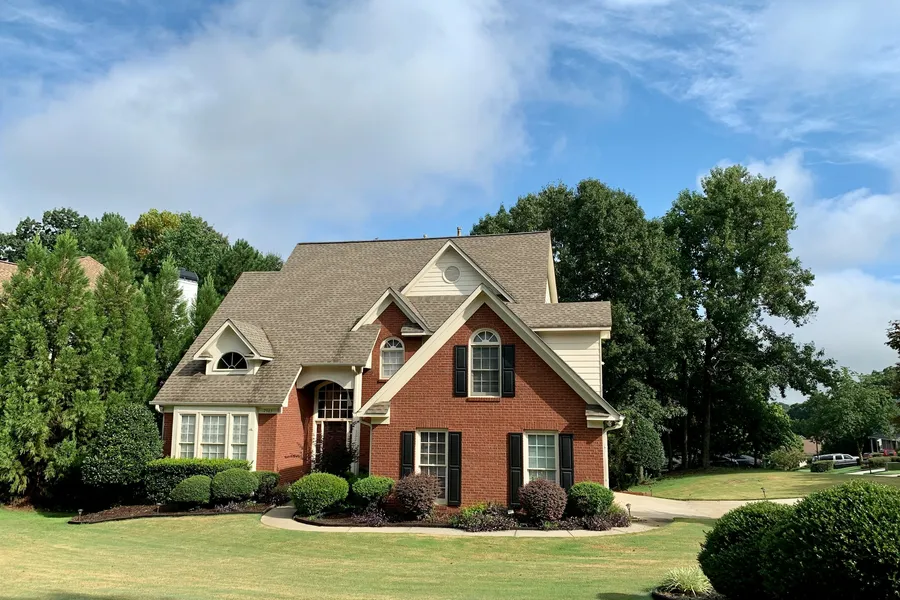
AI sky replacement detects the sky in an exterior photo and swaps it for a clean one — clear blue, partly cloudy, golden hour, or dramatic — while keeping the building, rooflines, and trees pixel-for-pixel. EnhanceCraft builds the sky mask automatically and harmonises the foreground light to the new sky, so a grey or blown-out shot becomes a bright, natural listing photo in seconds without a reshoot.
Before
After
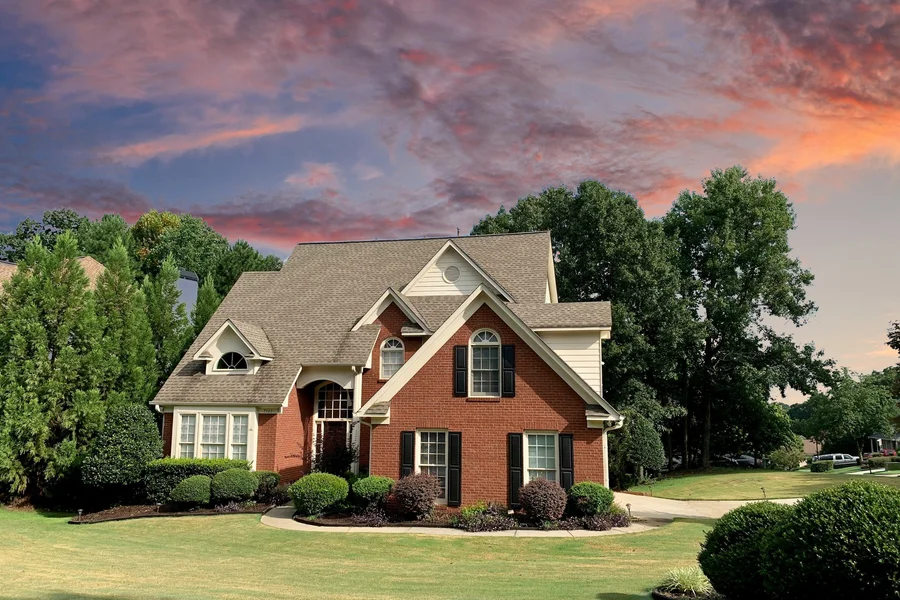
More examples like this: browse before & after results across every tool.
You scheduled the exterior shoot weeks ago, the home looks immaculate, and then the day arrives flat and grey. The architecture is perfect, the framing is right, and the sky behind it is a wall of featureless white. On a listing portal, that single dull sky is enough to make a beautiful property scroll right past. Reshooting means waiting for the weather, coordinating with the owner again, and burning another half-day on the road.
Sky replacement solves that without a reshoot. Instead of gambling on the forecast, you swap the sky in the photo you already have — turning a grey, overcast, or blown-out exterior into a bright, inviting shot in seconds. This guide explains exactly how AI sky replacement works for real estate, how to choose the right sky, how to keep the result believable, and how to do it across a whole shoot at once.
What Is AI Sky Replacement?
AI sky replacement is an edit that detects the sky region in a photo and swaps it for a different one, while leaving everything below the roofline untouched. For real estate, that means a dull or white sky becomes a clear blue, partly cloudy, golden-hour, or dramatic sky — and the building, rooflines, chimneys, and trees stay exactly as they were shot. The AI builds a precise sky mask automatically, so you do not have to trace around gables, branches, or power lines by hand.
The key idea is that only the sky changes. A good sky replacement is not a filter applied to the whole image — it is a targeted swap of one region, followed by a light pass that matches the foreground to the new sky's light so the photo reads as one natural scene rather than a paste-up.
Why a Dull Sky Costs You Views
Exterior hero shots do most of the work on a listing. They are the thumbnail buyers see first in search results, the lead image on the portal, and the photo that decides whether someone clicks through or keeps scrolling. A flat white sky drains the contrast and warmth out of that first impression, and it makes even a well-photographed home look like it was shot on a bad day.
A clean sky does the opposite. It frames the property, adds depth behind the rooflines, and signals "this listing is cared for." For agents and photographers competing on the same portal, that polish is often the difference between a click and a pass — and it is the kind of consistency buyers unconsciously expect from premium listings. Sky replacement lets every exterior in a set carry that same bright, intentional look, regardless of what the weather did on shoot day.
How AI Sky Replacement Works
Three things happen under the hood, and understanding them helps you get better results.
First, the AI detects the sky. It builds a mask that separates sky pixels from everything else, following the real edges of rooflines, trees, railings, and fine detail like branches against the horizon. Because the mask is generated from the image itself, it handles the awkward, fiddly edges that take the longest to mask by hand.
Second, it replaces only the masked region with your chosen sky. The building, foreground, and landscaping are restored pixel-for-pixel — nothing below the roofline is invented, moved, or smoothed away. This is what keeps the edit honest: the property in the photo is still the property that was shot.
Third, it harmonises the foreground. A new sky changes the light in a scene — a golden-hour sky implies warm, low sun; a clear blue sky implies bright, neutral daylight. The harmonisation step nudges the building's colour and tone toward that new light so the foreground and sky agree. Without it, a warm sky over a cool-lit house looks composited. With it, the whole frame reads as one moment.
Choosing the Right Sky Style
Our sky replacement gives you four ready-made skies plus the option to bring your own. The best choice depends on the property and how much sky is visible in the frame.
| Sky style | Best for |
|---|---|
| Clear Blue | The safe, all-purpose choice that suits almost any listing |
| Partly Cloudy | A natural, inviting look with soft white clouds |
| Golden Hour | Added warmth and a premium feel for higher-end homes |
| Dramatic | Wide establishing shots with lots of open sky |
| Upload your own | Matching a specific brand look or a real local sky |
A few rules of thumb: clear blue is the default that almost never looks wrong. Partly cloudy adds a little character without drawing attention to itself. Golden hour flatters premium and architectural listings but can look heavy on a small patch of sky. Dramatic skies shine on aerial and wide street-front shots where the sky fills the top third of the frame — on a tight shot with only a sliver of sky, a busy dramatic sky can look out of place.
If you upload your own sky, use a landscape, mostly-sky photo with no buildings or horizon line in it. We detect the sky automatically and flag uploads that are not mostly sky, so you get a clean source to composite from.
How to Replace a Sky in Under a Minute
- 1.Upload your exterior photo. The original, unedited shot works best — see the note on HDR below.
- 2.Pick a sky style — clear blue, partly cloudy, golden hour, or dramatic — or upload your own sky.
- 3.Keep harmonisation on so the building's light matches the new sky and the scene reads as one shot.
- 4.Download the finished photo with a natural new sky and a matched foreground.
That is the entire workflow. There is no masking, no layers, and no compositing — you upload, choose a sky, and download. Try sky replacement free and run your first exterior in seconds.
Manual Sky Replacement vs AI
Sky replacement has existed in photo editors for years, but doing it by hand is slow and skill-dependent. The comparison below is against manual masking and compositing in a desktop editor, not against any particular product.
| Factor | Manual editing | AI sky replacement |
|---|---|---|
| Time per photo | 10–30 minutes | A few seconds |
| Skill needed | Masking and compositing experience | None — upload and pick a style |
| Edge accuracy | Hand-masking around rooflines and trees | Automatic AI sky mask, foreground kept pixel-for-pixel |
| Foreground match | Manual colour grading | One-click harmonisation |
| Consistency across a set | Hard to match by hand | Same sky applied to every photo |
| Cost | Editor's time or an outsourcing fee | 2 credits per image |
For a single hero shot, a skilled retoucher can produce a beautiful manual composite. The problem is volume: a working real estate photographer might shoot a dozen exteriors a week, and hand-masking each one — then colour-matching the foreground — does not scale. AI sky replacement turns a half-hour edit into a few seconds, which is what makes it practical for everyday listing work rather than just the occasional showcase image.
Getting Natural, Believable Results
The difference between a sky swap that sells a home and one that looks fake usually comes down to a few habits.
Start with the original, unedited photo. Sky replacement works best on the raw exterior shot. If you have already pushed a heavy HDR or sky-recovery edit, the blown-out sky may have baked-in halos and colour fringing that reduce mask accuracy. Feed in the clean original and let the tool handle the sky.
Leave harmonisation on. It is tempting to turn it off to keep the building "exactly as shot," but a new sky implies new light. Harmonisation is what makes the foreground and sky agree — without it, even a perfect mask can look pasted on.
Match the sky to the light in the photo. If the home was shot in flat midday light, a clear blue or partly cloudy sky sits naturally. If you reach for a dramatic golden-hour sky over a photo with hard noon shadows, the mismatch between sky and shadows is the first thing a buyer's eye catches. Pick a sky whose implied light direction is close to what is already in the frame.
Keep a set consistent. When you publish a gallery, use the same sky style across every exterior so the listing feels coherent. A blue sky on the front and a dramatic sunset on the back of the same house reads as edited; one consistent sky reads as a good day.
Watch the light direction, not just the colour. The quickest tell is a sky whose implied sun sits opposite the shadows on the driveway. Note which side of the house is lit and which way the shadows fall, then pick a sky whose bright region agrees. Where a sky is nearly right but reversed, mirroring it horizontally resolves the mismatch without touching anything else.
Inspect the horizon, not the roofline. Most composites give themselves away where the sky meets distant trees and neighbouring rooftops rather than around the subject building. Zoom to 100% along that edge and look for a hard cut or a faint bright halo; what a real sky does there is soft and slightly irregular.
Look at the windows. Glass reflects whatever is above it. If the sky has changed dramatically and every pane still mirrors flat grey, the eye registers the contradiction before the viewer can name it. On a facade with a lot of glazing, that is a good reason to stay close to the original conditions. ## Sky Replacement Across a Whole Shoot
A single listing can have several exterior angles, and a property marketer may be turning around dozens of homes a week. Doing them one at a time still beats manual editing, but it is not the fastest path. Our bulk sky replacement mode lets you apply the same sky style to a batch of exteriors in one pass, so an entire shoot — or an entire week of shoots — comes back with one consistent, bright sky. That consistency is exactly what makes a portfolio of listings look professionally produced rather than individually patched.
Combining Sky Replacement With Other Edits
Sky replacement is one step in a real estate edit, and it pairs naturally with the rest of our exterior and interior tools:
- ●Pair it with day-to-dusk when you want the premium twilight version of the same exterior — a glowing dusk sky and warmly lit windows instead of a daytime blue.
- ●Use the photo dehazer first on hazy drone and landscape shots so distant rooflines and horizons are crisp before the sky goes in.
- ●For interiors, window pull recovers the blown-out view through bright windows the same way sky replacement rescues the sky outside.
- ●To enhance real estate photos across a whole listing, the edit pack brings these exterior and interior fixes together in one place.
A typical exterior workflow is: start from the clean original, dehaze if the shot is hazy, replace the sky, and — for a premium hero image — produce a separate day-to-dusk version. Each step is targeted, so the property itself is never misrepresented — and every step runs in the browser as part of EnhanceCraft's AI image enhancement toolkit, with no software to install.
Is Sky Replacement Allowed in Real Estate Listings?
Sky replacement is permitted almost everywhere, but describing it as a routine edit on a par with colour correction overstates the case, and the ground moved in 2026. The defensible position is narrower than the industry habit: use a sky that is plausible for that property, never one implying a view or a condition the location cannot produce, disclose it where your board or state requires, and keep the untouched original.
Three sources set the boundary, and they do not all say the same thing.
California AB 723, effective 1 January 2026, requires a disclosure statement plus a link, URL, or QR code to the original unaltered image. Its carve-out is specific: "lighting, color correction, cropping, or straightening" that does not materially alter the representation of the property. Sky replacement is not on that list. It is also not named on the altered list, which cites elements such as fixtures, furniture, flooring, paint, landscape, facade, and neighbouring properties. That leaves a sky swap in a genuine grey zone rather than a settled exclusion, which is reason enough to disclose it and to ask your brokerage's counsel rather than assume.
Bright MLS is unambiguous about the failure mode. Its published images policy strictly prohibits modifying a photo "to include visual elements not within a property control", with the example of "editing in a view of a scene that is not physically possible from the specified location in the real world." A believable overcast-to-blue swap is a different act from dropping a mountain range or an impossible sunset behind the roofline. The first changes the weather. The second changes the view, and the view is part of what is being sold.
Stellar MLS regulates exterior edits in the same spirit, explicitly prohibiting removing utility lines, adding landscape plantings, and covering up material flaws. A sky that quietly takes a power line out of the frame with it has stopped being a sky edit.
Sitting above all three is NAR's Article 12 duty to present a true picture, extended to images by Standard of Practice 12-10, which bars manipulating content "in any way that produces a deceptive or misleading result". That is a test of effect rather than of paperwork: a disclosed sky that still misleads fails it.
The rule that keeps you clear of all four is short. Swap the weather, never the view. The full disclosure picture is in what actually changed in 2026, and the board-by-board detail in the MLS photo requirements checklist.
Frequently Asked Questions
Is sky replacement free to use? You can run sky replacement on 2 images per day free without an account. Create a free account to get 25 credits and remove the watermark. After that it costs 2 credits per image.
Will it change the building, rooflines, or trees? No. An AI sky mask isolates only the sky, so the building, rooflines, and trees are restored pixel-for-pixel. Only the sky region is regenerated, and an optional harmonisation pass gently matches the foreground light to the new sky.
Which sky style should I pick for a listing? Clear blue is the safe all-purpose choice. Partly cloudy adds natural character, golden hour adds warmth for premium homes, and dramatic works best on wide shots with lots of open sky.
Does it work on photos that are already HDR-processed? For the best result, use the original, unedited photo. Heavy HDR already baked into the sky can introduce halos and reduce mask accuracy.
Can I replace the sky on a whole shoot at once? Yes. Bulk mode applies the same sky style across a batch of exteriors in one pass, so an entire listing or week of shoots comes back with one consistent sky.
Is it allowed to replace the sky in real estate listing photos? Almost everywhere, yes, but it is not the free pass it is often described as. Bright MLS strictly prohibits editing in a view that is not physically possible from the property; California's AB 723 excludes only lighting, colour correction, cropping and straightening from its disclosure requirement, so a sky swap is not clearly exempt; and NAR's Standard of Practice 12-10 bars any image edit producing a misleading result. Swap the weather rather than the view, disclose where your board or state requires it, and keep the unaltered original.
Rescue Your Next Grey-Sky Shoot
A flat sky should not cost you a reshoot or a click. Upload an exterior, pick a sky that fits the property, keep harmonisation on, and download a bright, believable shot in seconds — with the home kept exactly as photographed.
Try our free AI sky replacement tool and turn your next overcast shoot into listings that stand out.
Found this helpful?
Share it with your network
Ready to try it yourself?
25 free credits to start, then 10 every month. No credit card. Process your first image in under 15 seconds.
Try Sky Replacement freeMunib Ali Laghari
Founder & Lead Developer · EnhanceCraft
Munib Ali Laghari is the founder and lead developer of EnhanceCraft, an AI image toolkit. He writes about AI upscaling, photo restoration, and background removal. Connect on LinkedIn