Ghost Mannequin Photography: The Invisible-Mannequin Effect Without a Studio (2026)
Create the ghost mannequin (invisible-mannequin) effect without a studio: photograph a garment, remove the mannequin, and get a hollow 3D shot in one click.
Munib Ali Laghari
Founder & Lead Developer
Quick answer
What is ghost mannequin photography and how do you create the effect?
Ghost mannequin photography — also called the invisible-mannequin or hollow-man effect — shows a garment holding a natural 3D shape with no visible model or mannequin inside it. You photograph the clothing on a mannequin, then edit the mannequin out and fill the neckline so it reads hollow. EnhanceCraft’s ghost mannequin tool does this automatically from one photo.
Before
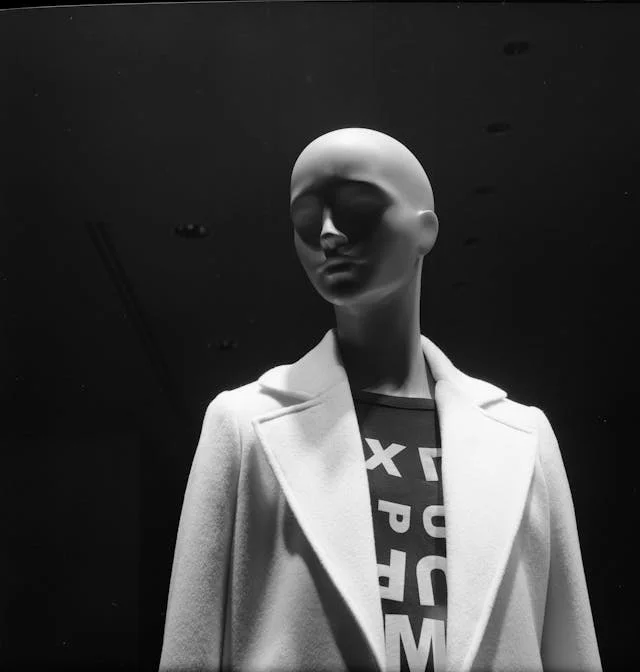
After
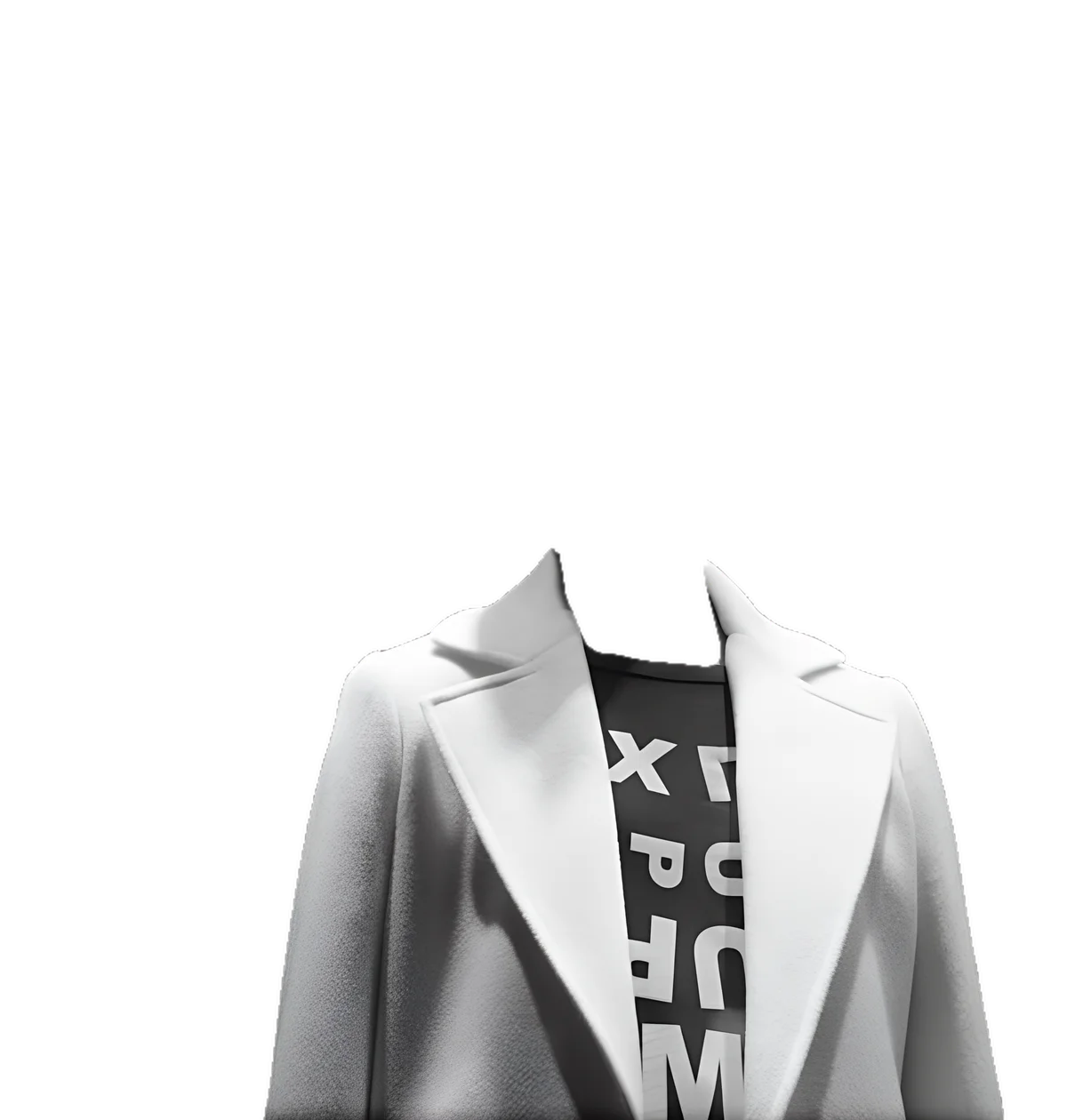
More examples like this: browse before & after results across every tool.
A flat-lay tells a shopper the color of a shirt. A ghost mannequin tells them how it sits on a body — the way the collar stands, how the shoulders fall, where the fabric drapes — without a model in the frame. That three-dimensional "worn but empty" look is why apparel brands, from marketplace sellers to boutique labels, shoot it. And until recently, getting it meant a studio, a two-shot setup, and a careful hour in a photo editor for every single garment.
In 2026 you can produce the same invisible-mannequin effect from one phone photo. This guide covers what ghost mannequin photography actually is, why it converts better than a flat-lay for clothing, how the traditional studio method works, and how to recreate it automatically — no studio, no second shot, no manual compositing.
What Is Ghost Mannequin Photography?
Ghost mannequin photography — also called the invisible-mannequin, hollow-man, or 3D-mannequin effect — is a product-photography technique for clothing where a garment is shot on a mannequin and the mannequin is then edited out. The result shows the garment holding a realistic three-dimensional shape, as if worn by an invisible person, with the inside of the collar visible through the neck opening.
That last detail is what sells the illusion. A plain cutout of a garment looks flat and lifeless; a true ghost mannequin shot shows the inner back of the collar through the neckline, so the eye reads a hollow, filled-out, 3D form. The garment looks like it is being worn — just by nobody. Retailers use the terms interchangeably, so you will see the same technique called "invisible mannequin," "hollow man," "ghost mannequin," and "3D mannequin" depending on who is writing the brief. They all mean the same thing: a garment with its shape intact and the mannequin invisible.
Why Apparel Brands Use the Ghost Mannequin Effect
Brands use ghost mannequin shots because they show fit and structure — drape, shoulder line, collar shape — that a flat-lay simply cannot, while staying cheaper and faster than booking a model. The garment stays the hero of the frame, the look is consistent across an entire catalog, and the clean result drops straight onto the white background that apparel listings require.
Here is how the three standard ways to shoot a garment compare:
| Factor | Flat-lay | Ghost mannequin | On-model |
|---|---|---|---|
| Shows 3D fit and drape | No | Yes | Yes |
| Needs a model | No | No | Yes |
| Cost and speed | Cheapest, fastest | Low | Highest |
| Catalog consistency | Medium | High | Lower — varies by model and pose |
| Keeps focus on the product | Medium | High | Split with the model |
| White-background ready | Yes | Yes | Usually needs cleanup |
The ghost mannequin sits in the sweet spot: it carries almost all of the "shows the fit" advantage of an on-model shoot at close to the cost and consistency of a flat-lay. For a catalog of dozens or hundreds of SKUs — where booking models for every piece is impractical and flat-lays make structured garments look shapeless — it is the format most apparel sellers default to.
The Traditional Way (and Why It Needs a Studio)
The classic method is a two-shot composite. You photograph the garment on a mannequin to capture the main shape, take a second shot of the inside neckline — often using a mannequin with a removable neck piece — and then combine the two in a photo editor: cutting out the mannequin and layering the interior shot so the collar reads as hollow. It works, but it is slow and skill-dependent.
The friction is in the details. Dressing the mannequin so the garment sits smoothly takes time. The interior "neck join" — compositing the inside-collar shot into the neck opening so the seam is invisible — is fiddly manual work, and it has to be redone for every garment. Cutting the mannequin cleanly around straps, sheer fabric, and fine edges is where most of the hour goes. Multiply that by a catalog and the ghost mannequin, for all its polish, becomes the bottleneck that keeps new products from going live. It is exactly the kind of repetitive, high-skill task that should not be manual anymore.
How to Create the Ghost Mannequin Effect Without a Studio
You can skip the two-shot setup entirely. With EnhanceCraft's ghost mannequin tool, you photograph the garment on any mannequin, dress form, or even a hanger, click the mannequin once, and AI removes it, fills the neckline so it reads hollow, strips the background, adds an optional ground shadow, and upscales the result — all in a single pass.
- 1.Photograph the garment on a mannequin or hanger. Shoot the garment on a mannequin, dress form, or hanger against a plain background. A single, evenly lit phone photo is enough — no second interior shot required. Upload it as a JPEG, PNG, or WebP up to 25 MB (50 MB on paid plans).
- 2.Click the mannequin to select it. Click directly on the mannequin body — not the garment — and AI outlines its shape automatically. Right-click to refine the selection and exclude any garment areas the outline caught.
- 3.Let the pipeline run. In one pass, the mannequin is removed, the interior is filled with AI-generated fabric so the neckline and openings look genuinely hollow, the background is stripped away, an optional ground shadow is added for a studio feel, and the image is upscaled 4x.
- 4.Download the invisible-mannequin result. Your finished ghost mannequin image downloads on a clean background — ready to drop straight into a product listing, with no watermarks.
The interior fill is the part that used to demand a second shot and a removable-neck mannequin. Instead of photographing the inside of the collar separately, the tool generates plausible inner fabric and composites it into the opening for you — which is why a standard mannequin, a dress form, or even a garment on a hanger all work as the input. It reconstructs the hollow look faithfully rather than inventing a different garment, so the result still represents what you are actually selling.
Ghost Mannequin vs Flat-Lay vs On-Model: Which to Use
Use a ghost mannequin when structure matters and model costs do not make sense; use a flat-lay for simple, unstructured items; use on-model when lifestyle context is the selling point. Most apparel catalogs use a mix — ghost mannequin as the workhorse main image, with the occasional on-model or flat-lay as a secondary shot.
- ●Ghost mannequin — best for structured pieces where drape and fit sell the product: shirts, dresses, jackets, outerwear, tailored and knitwear. It gives a clean, consistent catalog without model fees.
- ●Flat-lay — best for simple, flat items where 3D shape adds little: tees, socks, accessories, folded goods, and styling-led "outfit" compositions.
- ●On-model — best when scale, movement, or aspirational styling is the point: lifestyle campaigns, fit-on-a-real-body reassurance, and hero marketing images.
For the main catalog image that has to load fast, look consistent, and meet marketplace rules, the ghost mannequin usually wins. For the full evidence behind that split — including what the research does and does not support about which format converts — see ghost mannequin vs flat lay vs on-model.
Getting Clean Ghost Mannequin Results
The best ghost mannequin results start with a well-lit garment on a plain background and a mannequin that is fully covered by the clothing. Even, diffuse light and a garment that holds its shape give the AI a clean edge to work with and a believable interior to fill. A few habits make the difference between a shot that looks studio-grade and one that looks pasted-on.
Dress the mannequin properly. Clip or pin the garment at the back so it sits smooth and symmetrical. Wrinkles and sagging that look minor on the mannequin become obvious once the form disappears.
Shoot on a plain, contrasting background. A background that contrasts with the garment gives the AI a clear mannequin edge to trace. Avoid busy surfaces or a background that matches the clothing color.
Click the mannequin, not the garment. Select the mannequin body directly; the AI outlines its shape from there. If the outline grabs part of the garment, right-click to refine and exclude those areas.
Light the inside of the neckline. Even lighting with no harsh shadow inside the collar makes the interior fill blend seamlessly. Flat, diffuse light beats a single hard key light for this effect.
Add the ground shadow. For store and marketplace listings, the optional ground shadow grounds the garment so it reads as a real, physical product rather than a floating cutout.
Doing a Whole Catalog at Once
Ghost mannequin is batch-compatible, so you can shoot every garment in the same mannequin position and process the entire set in one job. Batch mode applies one shared selection across the images, so a full clothing catalog comes back with identical framing, the same clean background, and a consistent hollow effect from the first SKU to the last.
That consistency is what makes a storefront read as a real brand rather than a patchwork of mismatched photos. For the complete listing workflow — turning these ghost mannequin shots into marketplace-compliant images on pure white — pair this with the product pipeline, and see the e-commerce hub for how the pieces fit together. It all runs in the browser as part of EnhanceCraft's AI image toolkit, with no software to install. Your first 25 free credits cover several garments, then you get 10 every month, and any pay-as-you-go credits you add never expire — so a seasonal drop you shoot now is still yours to finish later.
Fill Every Listing With Studio-Grade Apparel Shots
The ghost mannequin effect no longer needs a studio, a removable-neck mannequin, or an hour of compositing per garment. Photograph the piece on any mannequin or hanger, click once, and download a clean, hollow, 3D-looking product shot in seconds — one garment or a whole catalog in a single batch.
Try the free ghost mannequin tool — 25 credits to start, then 10 every month, no card required, and pay-as-you-go credits that never expire. Turn a rack of samples into a listing-ready apparel catalog without booking a studio.
Found this helpful?
Share it with your network
Ready to try it yourself?
25 free credits to start, then 10 every month. No credit card. Process your first image in under 15 seconds.
Try Ghost Mannequin freeMunib Ali Laghari
Founder & Lead Developer · EnhanceCraft
Munib Ali Laghari is the founder and lead developer of EnhanceCraft, an AI image toolkit. He writes about AI upscaling, photo restoration, and background removal. Connect on LinkedIn